ID Card, Passport, Driver Lice
FaceOnLiveLibraries & Demo
3.323.00 Reviews
- Version
- 1.1
- Installs
- 100.00K
- Age Rating
- Everyone
Screenshots
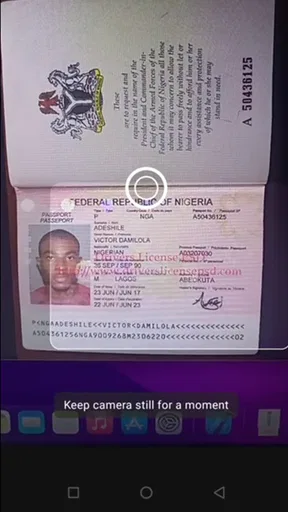
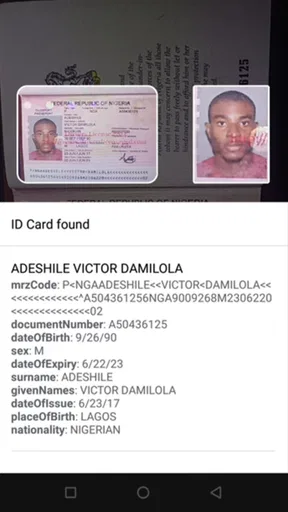
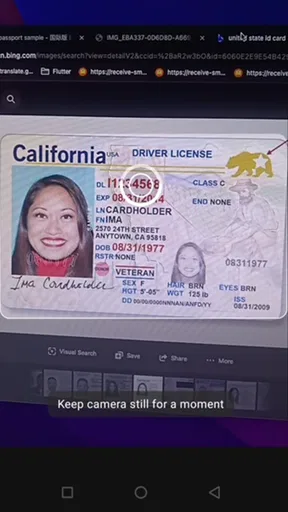
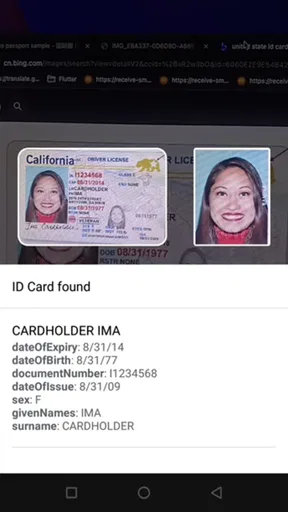
Our Review of ID Card, Passport, Driver Lice
 Analysis by Appyee
When I need to turn an identity document into usable information, I usually want two things: a quick result and confidence that the document itself stays under control. ID Card, Passport, Driver Lice is built around that exact decision. It is a free Android app from FaceOnLive in the Libraries & Demo category, focused on recognizing identity cards, passports, and driver licenses directly on the device.
That focus makes it easier to judge than a general scanner. This is not an app I would install for editing receipts, organizing PDFs, or replacing a full document-management suite. I see it as a focused recognition tool for moments when manually copying identity details would be slow or error-prone. Its store summary emphasizes on-device and offline use, which is especially relevant when I am dealing with personal documents and do not want the basic recognition step to depend on an internet connection.
My overall view is positive but specific: this is worth trying if your main need is identity-document recognition and you use a compatible Android phone. It is less convincing for people who expect a complete workflow for saving, exporting, verifying, or managing documents after recognition. The important question is therefore not whether it sounds useful in general, but whether its narrow purpose matches the way you actually work.
How I would decide whether it fits
I would judge this app by whether it removes a recurring annoyance, not by how impressive a first scan feels. In this section, I’d look at how often identity details come up in your routine and whether a quick recognition step would genuinely save effort. That distinction helps separate a useful occasional tool from one that deserves a regular place on your phone.
The first test is the document, not the brand
Before choosing any recognition app, I would start with the documents I handle most often. This app names ID cards and passports in its short description, while its broader positioning also includes driver licenses. That makes it relevant for travel preparation, identity checks in personal workflows, and situations where I need to read structured document information without typing every field by hand.
The practical test is simple. I would place one document on a flat, uncluttered surface, use even lighting, and keep the camera parallel to the document rather than holding it at a sharp angle. Glare, folded edges, shadows, and cropped corners are the kinds of problems that can make any recognition tool less dependable. An app can help interpret a clear image, but it cannot reliably reconstruct text that the camera never captured.
I would also test the documents I actually use rather than assuming that one successful scan proves everything. Identity documents vary in layout, typography, security patterns, and machine-readable areas. A passport may present information differently from a national ID card, and a driver license can have its own arrangement. For that reason, I would treat the first few scans as a compatibility check for my particular documents.
Offline processing changes the decision
The on-device and offline emphasis is one of the most meaningful reasons to consider this app. When I am traveling, working in a restricted environment, or handling a document in a place with unreliable reception, an offline-oriented workflow is more practical than one that assumes constant connectivity. It also reduces the number of steps between taking a picture and obtaining a recognition result.
There is a useful privacy habit here: I would enable only the access needed for the immediate task, scan the document in a controlled setting, and avoid leaving unnecessary copies in the phone’s gallery or messaging apps. Offline recognition does not automatically answer every privacy question about what happens after a result is produced, so I would still review the app’s behavior on my own device and avoid treating it as a secure vault.
This distinction matters because “offline” is most valuable during recognition, not necessarily as a complete document-security promise. I like the idea of keeping the recognition stage local, but I would not use the app as the sole place to store sensitive identity information. For a one-time reading task, that is a reasonable boundary. For long-term records, I would choose a dedicated, carefully managed system instead.
Version and device expectations
The app runs on Android devices using version 5.0 or later, and its current version is 1.1. That gives it a broad technical starting point, including older phones that cannot run many newer applications. Still, support for an older Android baseline does not guarantee the same camera experience on every device. Image quality, focus speed, and screen size can affect how comfortable the process feels.
I would make sure the phone has enough light and a reasonably capable camera before blaming the recognition engine for poor results. On a small or older handset, framing a full passport page or a card with a reflective surface may take more patience. The app’s low version number also makes me approach it as a focused utility rather than a mature all-purpose platform with a long list of polished extras.
Who gets the most value
I think the strongest audience is people who occasionally need to read identity documents without manually transcribing them. A traveler preparing information for a booking, a small business owner organizing a customer intake step, or a developer demonstrating document-recognition concepts could all find the narrow focus useful.
It may also suit someone who wants an offline-first option instead of sending a document image through a web service. That does not remove the need for care, but it can make the first step feel more contained. The free price lowers the cost of testing it with a non-sensitive sample or a document you are comfortable using during evaluation.
I would skip it if I need a complete digital identity platform, a polished archive, or a guaranteed replacement for official verification. Recognition and verification are not the same thing. A tool can read printed or machine-readable information while still requiring a person or institution to confirm that the document is genuine, current, and being presented by the right individual.
Where the focused approach works best
The focused approach makes the most sense when the task is narrow: reading an identity document, checking the result against the original, and moving on. I’d consider whether that sequence fits travel preparation or occasional form-filling without turning into a bigger record-keeping process. The next section weighs that convenience against situations where a broader document tool is more practical.
A realistic travel preparation workflow
Imagine I am preparing for a trip and have several documents spread across a desk. I need to compare names, document numbers, and expiry information while filling out forms. Instead of repeatedly switching between a passport and a form, I can use the app as a recognition aid, check the captured result against the physical document, and then enter the information where it belongs.
The important part of that workflow is the second look. I would never submit a recognized document number without comparing it character by character with the original. Letters and numbers can look alike, and a small recognition mistake can cause a booking or application to fail. The app can reduce typing, but I remain responsible for confirming the result.
A useful technique is to scan in a quiet sequence rather than rushing through several documents. I would complete one document, verify the output, and then move to the next. That makes it easier to notice whether a particular card design is being read consistently. It also prevents a mistaken result from being copied into multiple forms before I notice the problem.
Why local recognition is more than a convenience
For identity documents, the location of processing is part of the product’s value. An online scanner may offer a familiar browser workflow, but it can require an upload before recognition begins. An offline-capable app changes the starting point: I can attempt recognition without depending on a network connection or placing the image into an online service as part of the basic process.
That advantage is strongest in controlled, short-lived tasks. If I am checking a document while traveling or working away from a stable connection, local processing can remove a frustrating dependency. It also makes the app easier to consider in settings where sending identity images to an external service would be undesirable.
At the same time, I would not confuse local processing with perfect accuracy. The result still depends on the camera image, the document layout, and the way the document is positioned. My best results would come from treating the app like a careful assistant: it handles repetitive reading, while I provide good input and perform the final check.
Three practical habits that improve the experience
- Capture the entire document first. I would avoid cropping too tightly around a name or number, because the surrounding layout can help recognition and makes it easier to compare the result with the original.
- Control reflections before rescanning. For glossy cards, I would move the phone or light source slightly instead of repeatedly pressing the capture button from the same angle. A clean, glare-free image is usually more useful than a faster but damaged-looking capture.
- Use recognition as a draft, not as authority. I would copy only after checking confusing characters, especially in long identification numbers, dates, and names containing uncommon letter combinations.
These habits are not flashy features, but they change whether the app feels dependable. The most common failure in document recognition is often not a missing function; it is accepting a plausible-looking result without comparing it to the source. A short verification step makes the tool much safer to use in everyday forms.
What the audience numbers suggest, without overreading them
The app has passed one hundred thousand installs and holds a 3.3 average from 641 ratings, with 23 written reviews. I read that as evidence of real interest, but not as proof that it will work equally well for every document type or phone. The rating is notably mixed, so I would approach it as a utility worth testing rather than an automatic recommendation for every user.
That middle-ground reputation actually fits the product’s position. Recognition apps can be highly useful in the right situation and frustrating in the wrong one. A person scanning a clear, supported document may find the experience efficient, while someone expecting flawless reading from a damaged or unusual document may judge it much more harshly.
Where another category may fit better
A different category can be the better choice when the job extends beyond reading information from a card or passport. I’d compare the app with a scanner for preserving document images, or with an official service when formal authentication is required. Thinking through the destination of the information—not just how it is captured—makes that choice clearer.
General document scanners have a different priority
A conventional document scanner is often better when the main objective is creating a clean image or PDF. It may be the stronger choice for receipts, contracts, handwritten notes, and multi-page paperwork. If I need to preserve the visual appearance of a document for sharing or archiving, I would look at that category first rather than choosing a recognition-focused app.
ID Card, Passport, Driver Lice makes more sense when the information inside an identity document matters more than producing a polished scan. That is an important trade-off. A scanner can give me a visual copy that I inspect manually, while a recognition tool aims to reduce the work of reading and transcribing structured details. Neither approach replaces the other.
Cloud-based services may suit team workflows
A web service or cloud document platform can be preferable when multiple people need access to a central workflow. Teams may value shared records, browser access, review queues, or connections to other business systems. I would not choose this small Android utility as the centerpiece of a large collaborative process unless it clearly matched the organization’s requirements.
The advantage of a cloud alternative is usually convenience across devices and users; the cost is greater dependence on accounts, connectivity, and the handling of uploaded documents. The advantage here is the more direct, device-centered recognition approach. My choice would depend on whether I am solving a personal, occasional task or building a repeatable process for several people.
Official identity apps serve a different purpose
Some official or institution-specific identity applications are designed for digital credentials, formal authentication, or government services. Those tools may be necessary when an organization requires a particular verification method. A recognition app should not be treated as an equivalent substitute simply because it can read information from a physical document.
I would use this app to assist with reading and organizing information, not to claim that a document has been authenticated. If a bank, airline, employer, or government office specifies its own application or verification process, I would follow that requirement. The distinction protects me from using a convenient reading tool in a situation that demands formal validation.
When switching away is the sensible choice
I would move to another category if I repeatedly need searchable archives, reliable export options, batch processing, or a formal audit trail. Those needs go beyond the core promise of recognizing an ID card, passport, or driver license. I would also switch if my documents consistently produce results that require more correction than manual entry.
The cost of switching is relatively low because the app is free and focused. I can test it without committing to a subscription, then keep a scanner or official tool for tasks it does not cover. The real cost is not money; it is workflow friction. Every failed scan, manual correction, or repeated comparison takes time, so I would judge the app after several realistic documents rather than after one ideal capture.
My recommendation after weighing the trade-offs
After weighing the trade-offs, I’d keep expectations modest and let a few ordinary uses decide the matter. The app is most compelling when its offline-oriented recognition matches a specific need; it is less suitable when the task demands archiving, collaboration, or official verification. My recommendation is to treat it as a focused helper and keep checking its output against the physical document.
What I would do before relying on it
I would install it on a compatible Android phone, prepare a well-lit test area, and try the identity documents I expect to use most often. I would compare every recognized field with the physical document, paying particular attention to long numbers, dates, and names. I would also test the process without a network connection if offline use is important to me.
That small trial answers the questions that matter more than a store description: Does my phone frame the document comfortably? Does the app recognize my document layouts? Is the result quick enough for my routine? Do I feel comfortable with the way the information remains on the device after the task?
I would avoid beginning with a high-pressure situation, such as an airport desk or an urgent application deadline. Testing at home gives me time to learn the framing angle and identify documents that need extra checking. Once I know its behavior, I can decide whether it saves enough effort to deserve a place in my regular workflow.
Who should download it
I recommend giving it a try if you want a free, focused Android tool for recognizing identity documents, especially when on-device and offline processing are important priorities. It is a sensible experiment for occasional personal use, travel preparation, or simple document-reading tasks where manual typing feels unnecessary.
The Everyone content rating also makes it broadly approachable from an age-rating perspective, while the older Android requirement may help people using devices that are not on the newest software. I would still keep the use case narrow: scan, inspect, copy only what is needed, and avoid treating the app as a permanent storage location for sensitive records.
Who should choose something else
I would point someone toward a different solution if they need official identity verification, a shared business database, advanced document archiving, or a polished PDF-scanning workflow. I would also be cautious about recommending it as the only tool for critical forms. The mixed 3.3 average tells me that expectations should remain realistic, and recognition results deserve human review.
For me, the deciding strength is the combination of a narrow purpose, free access, and an offline-oriented approach. The deciding weakness is that recognition alone does not complete the larger job many people imagine when they hear “document app.” If I need more than reading identity information, I would pair it with another tool rather than forcing it to become something it is not.
The bottom line
My recommendation is to treat this as a practical recognition assistant, not a complete identity-management solution. FaceOnLive has made a straightforward app for a specific moment: getting useful information from an ID card, passport, or driver license without depending entirely on manual transcription or an online scanner.
That is enough to make it worthwhile for the right person. I would download it when I wanted a low-cost way to test offline document recognition on Android, and I would keep a physical document nearby for every final check. If your needs stop at that focused task, it may save time. If your needs continue into authentication, storage, collaboration, or formal compliance, another category will fit better.
Verdict
Strengths of ID Card, Passport, Driver Lice
- Keeps essential identity details available in one convenient place.
- Clean layout makes documents and records easy to organize.
- Useful for checking expiration dates before traveling or driving.
- Can reduce the need to carry physical copies for personal reference.
- Helpful for preparing information needed on official forms.
Limitations of ID Card, Passport, Driver Lice
- It may not be accepted as a legal replacement for physical documents.
- Storing sensitive personal data raises privacy and security concerns.
- Incorrect entries could cause problems when copying details into forms.
- A lost or damaged phone may make the saved information inaccessible.
- Some features may require permissions or paid access.
Similar Picks in This Category
View All
PGT: GFX, Launcher & Optimizer
Trilokia Inc.4.5

AusweisApp Bund
Governikus Service GmbH3.7

Cardboard
Google LLC3.2

Gamers GLTool with Game Tuner
Trilokia Inc.4.5

Multi Web Chat - Read Secretly
World Scan & Cleaner3.8

App Cloner Premium & Add-ons
App Listo1.9
Frequently Asked Questions
What is ID Card, Passport, Driver Lice used for?
ID Card, Passport, Driver Lice is designed to help users keep important identification details organized in one convenient place. Depending on the available features, it may provide digital reference pages, document information, or tools for managing ID cards, passports, and driving-licence data. It should be treated as an organizational utility rather than an official replacement for government-issued documents.
Can this app replace my physical ID card, passport, or driving licence?
No. The app should not be considered a legal replacement for an original identity card, passport, or driving licence. Government authorities, airlines, banks, police officers, and other institutions may require official physical documents or an approved digital credential issued by the relevant authority. Always carry valid documents when travelling or driving, and check local regulations before relying on any information stored in the app.
Is it safe to enter personal document information in the app?
Users should be careful before entering sensitive information such as document numbers, birth dates, addresses, or photographs. Review the app’s privacy policy, requested permissions, developer information, and data-handling practices before saving anything. Avoid adding unnecessary details, use a secure device lock, and do not share screenshots containing personal data. If the app does not clearly explain how information is stored or protected, use it only for general reference.
Does ID Card, Passport, Driver Lice work offline?
Some basic functions may work without an internet connection if information or reference material is stored locally on the device, but this can vary according to the app version and feature being used. Online services, updates, advertisements, verification tools, or linked government resources may require mobile data or Wi-Fi. Test the features before travelling, and never assume that offline information will be accepted as official proof of identity.
Is ID Card, Passport, Driver Lice available for both Android and iOS?
Availability depends on the developer and the specific version listed in each official app store. Before downloading, confirm that the publisher is legitimate, check the supported operating system, read recent user reviews, and compare the permissions requested by the app. Avoid unofficial copies or downloads from unknown websites, particularly when an application involves passports, identification documents, or driving-licence information.
